> For the complete documentation index, see [llms.txt](https://docs.veilio.xyz/llms.txt). Markdown versions of documentation pages are available by appending `.md` to page URLs; this page is available as [Markdown](https://docs.veilio.xyz/documentation/basics/use-cases.md).
# Veilio Use Cases
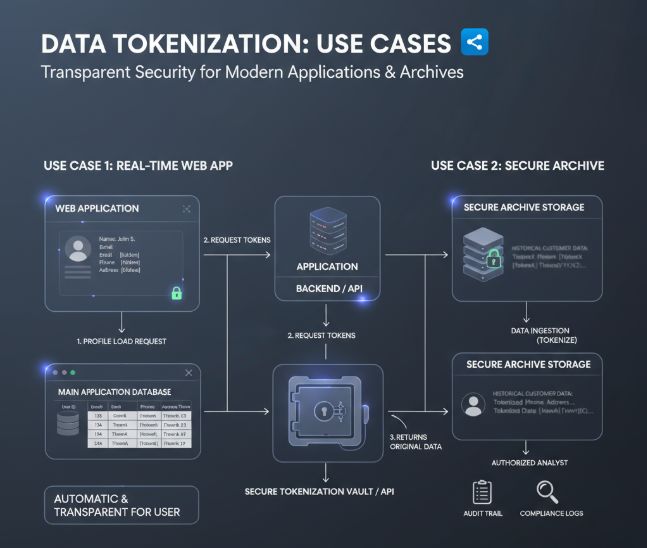
Veilio protects sensitive data by replacing raw values (email, phone, IDs, addresses…) with tokens, and by enforcing strict, auditable access when teams need to see the real value. Below are the most
***
#### 1) Account profile page
Situation\
Your user profile stores sensitive fields (email, phone number, address, IDs…).
With Veilio
* On write (sign‑up, profile update):
* Backend calls `POST /tokenize` for sensitive fields.
* Database stores `tok_...` instead of plaintext.
* On read (display profile, send notification):
* Backend calls `POST /detokenize` only when needed.
* UI never talks directly to Veilio.
Why it matters
* A SQL dump of the `users` table no longer exposes PII in clear.
* You keep the same UI and UX; only the storage path changes.
* You can attach retention and crypto‑shredding policies per token.
***
#### 2) Contact form / demo request form
Situation\
Your marketing/website form collects lead data (email, phone, company…).
With Veilio
* On form submit:
* Your edge/API layer calls Veilio to tokenize email/phone.
* Marketing tools/CRM/storefront receive tokens only.
* Lead enrichment / routing uses tokens as identifiers.
* When a verified system needs the real email (e.g. send an email), your backend detokenizes with a specific reason (`"support"`, `"marketing_campaign"`, etc.).
Why it matters
* These are often the most exposed flows (internet‑facing, unauthenticated).
* You reduce the blast radius of landing page leaks or misconfigurations.
* Great first “quick win” to validate Veilio on a visible but low‑risk surface.
***
#### 3) Legacy CSV & historical imports
Situation\
You already have historical exports (CRM files, CSVs, JSON dumps, old imports) containing PII.
With Veilio
* Upload existing datasets from the dashboard:
* CSV: classic header + rows.
* JSON: an array of objects (e.g. `[{"email":"..."},{"email":"..."}]`).
* For each dataset:
* Veilio builds a tokenized grid of values.
* You define column policies (which roles / users can see which columns).
* Consumers download a filtered, detokenized CSV when needed.
Why it matters
* You reduce risk on already existing sensitive archives without rewriting the app.
* You get a highly demonstrative POC (“before/after” on real data).
* It’s a natural bridge to analytics/BI use cases.
***
#### 4) Shared analytics datasets (Dataset Access Tokens)
Situation\
Data and BI teams (and sometimes partners) need to consume datasets for analysis: usage events, logs, customer cohorts, medical metrics, etc.
With Veilio
* Owner/DPO:
* uploads a dataset (CSV or JSON),
* defines column visibility policies per role/user,
* generates a Dataset Access Token with a specific TTL (e.g. `1h` or `24h`).
* BI / data engineers:
* use a simple `curl` or ETL job with header:
* `x-veilio-dataset-access-token: dsat_...`
* download a CSV where:
* only allowed columns are present,
* token values are detokenized under the hood when permitted.
Why it matters
* You avoid spreading raw dumps in S3 buckets, laptops, and ad‑hoc scripts.
* Dataset access is:
* scoped (dataset, org, user/role),
* time‑bound (short‑lived token),
* auditable.
* Fits very well teams like Medadom’s BI / ops / data units.
***
#### 5) GDPR exports & data subject access
Situation\
You need to provide users with a copy of their personal data (GDPR “right of access”), but a naive export from the database is too risky.
With Veilio
* Authenticated user requests export from the dashboard.
* Backend calls `POST /api/compliance/export` with:
* `format` (`json` or `csv`),
* a valid 2FA/TOTP code.
* Veilio:
* verifies session + 2FA,
* builds the export (detokenized where allowed),
* encrypts the file at rest,
* sends a one‑time download link to the user.
Why it matters
* DSAR / GDPR workflows become repeatable and auditable.
* Export files are:
* encrypted at rest,
* downloadable once,
* protected by session + token expiry.
* You don’t leave “full plaintext exports” lying around indefinitely.
***
#### 6) Database dumps & technical environments (UC8)
Situation\
Engineering and ops teams:
* create database dumps,
* refresh staging/QA from production,
* keep snapshots for debugging.
Without tokenization, these dumps often contain full PII.
With Veilio
* In production:
* sensitive columns are already tokenized, so dumps contain tokens.
* Before promoting a dump:
* a dump checker (policy + script) scans for plaintext PII patterns (emails, phone, IBAN, cards, etc.),
* if any disallowed match is found, the pipeline fails and the dump is not used.
* In staging/QA:
* teams work with tokens,
* any detokenization must go through Veilio with proper roles + audit.
Why it matters
* You keep the flexibility of dump/restore workflows without turning every dump into a compliance incident waiting to happen.
* Staging/QA can operate on realistic data shapes while remaining privacy‑preserving.
* It aligns dev/ops practices with your privacy‑by‑design posture.
***
#### 7) CRM & tools with native read access (Phase 2)
Situation\
Sales, support or medical teams need to view data directly inside CRMs or vertical tools (HubSpot, Salesforce, Zendesk, EMR…).
With Veilio
* Phase 1: you tokenise what’s stored in the CRM database (imports, sync).
* Phase 2:
* browser extension or native plugin,
* tokenization on input, detokenization on display via Veilio’s API, with role‑based controls.
Why it matters
* You upgrade highly exposed tools (CRMs, helpdesks) without disrupting daily workflows.
* Deep business value once you’re comfortable with the core tokenization flows.
***
#### In short
If you want to validate Veilio quickly, the typical entry points are:
* Profile page (core product),
* Contact / demo forms (public web),
* Legacy CSV / analytics datasets (batch/BI),
* GDPR exports (compliance),
* DB dumps (ops/dev).
### Related links
* Product website: [https://veilio.fr](https://veilio.fr/)
* Contact / Demo: